Wisconsin DCF · DCF-F-CFS0055
Incident Report
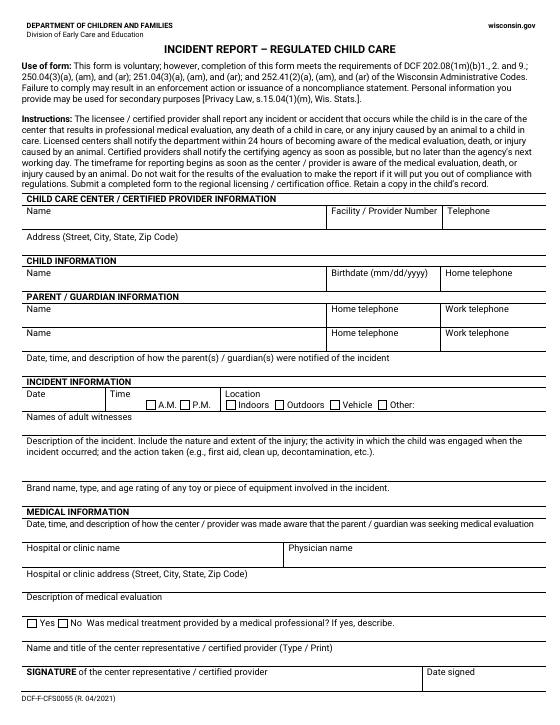
The Incident Report (DCF-F-CFS0055) is the form Wisconsin regulated child care providers use to document injuries, illnesses and other incidents involving a child, and to report certain incidents to their licensing specialist.
Download official PDFFree · 1 page · R. 04/2021 · Unmodified state form
- Completed by
- Staff who saw the incident
- Signed by
- Staff and director
- When it's due
- As soon as possible after the incident
- How often
- One report per incident
- Rule
- DCF 251.04
How to fill it out
- 1Write down what happened, when, where and who was involved.
- 2Describe first aid given and who was notified.
- 3Tell the parent the same day.
- 4Check the form's list of incidents that must also be reported to DCF, and send it on time.
Mistakes licensors notice
- Parent notification not documented.
- Reportable incidents never sent to the licensing specialist.
- Reports filed in a binder no one can find during a visit.
Skip the paper
Stop printing the Incident Report.
With KinderPilot™, families fill it out and sign on their phone, it lands in the right file, and you're reminded before it expires.
- Staff fill it out on a phone right after the incident.
- The answers print on the official state form.
- Reports are saved privately in the child's file.

Incident Report questions
Know when this form changes
States revise forms without much notice. We'll email you when a new version of the Incident Report is published.
Related forms
- Authorization to Administer MedicationDCF-F-CFS0059
- Safety and Emergency Response DocumentationDCF-F-CFS0543
This is the unmodified official form, published by Wisconsin DCF. KinderPilot is not affiliated with the State of Wisconsin. Always check the state's current version .